
Feature
Reviews That Collect Themselves — No Chasing Required
Woven sends review requests via WhatsApp the moment you mark a client attended. No chasing, no campaigns — reviews build automatically from every class.
Why Most Businesses Never Build a Review Base
Most service businesses never collect client reviews at scale — not because their clients are unhappy, but because the ask never reaches them at the right moment. Ask a small business owner why they don’t have many reviews and the answer is usually the same: they forget to ask, or they ask and nothing comes back.
Email review requests get ignored. The window between the class ending and the message landing is long enough for the moment to pass. Clients mean to leave something — they just never quite get around to it.
The result is a public profile with one or two reviews and a business owner who knows they need more but can’t find a system that doesn’t involve manual follow-up every time.
The gap isn’t enthusiasm. Your clients are happy — they keep coming back. The gap is the distance between the class ending and the ask reaching them. Woven closes it automatically.
How Woven Collects Client Reviews Automatically
The moment you mark a client as attended or attended late, Woven fires a review request via WhatsApp. Not in a separate campaign. Not via email. In the same conversation thread your client already uses for class reminders and booking confirmations — the one they’re already reading.
The review link is unique to that booking, cryptographically signed, and valid for 30 days. It carries everything Woven needs to identify the booking without asking your client to log in or identify themselves.
What the client sees:
- A WhatsApp message lands in their existing thread — the same one they received their booking confirmation in
- They tap the link — no account, no app, no login
- A simple form shows: class name, date, star rating (required, 1–5), and an optional text box (up to 2,000 characters)
- They tap submit — done in under 30 seconds
There’s nothing to configure, no template to write, no campaign to set up. The trigger is the attendance mark — the same action you’re already taking to track who showed up. Review collection is a side effect of doing your normal admin.
Dedup protection built in: if a client has already left a review for that class, the link shows them their original rating instead of the form. One review per class, per client — enforced automatically, not by you.
How to manage class attendance in Woven →
Where Your Reviews Appear
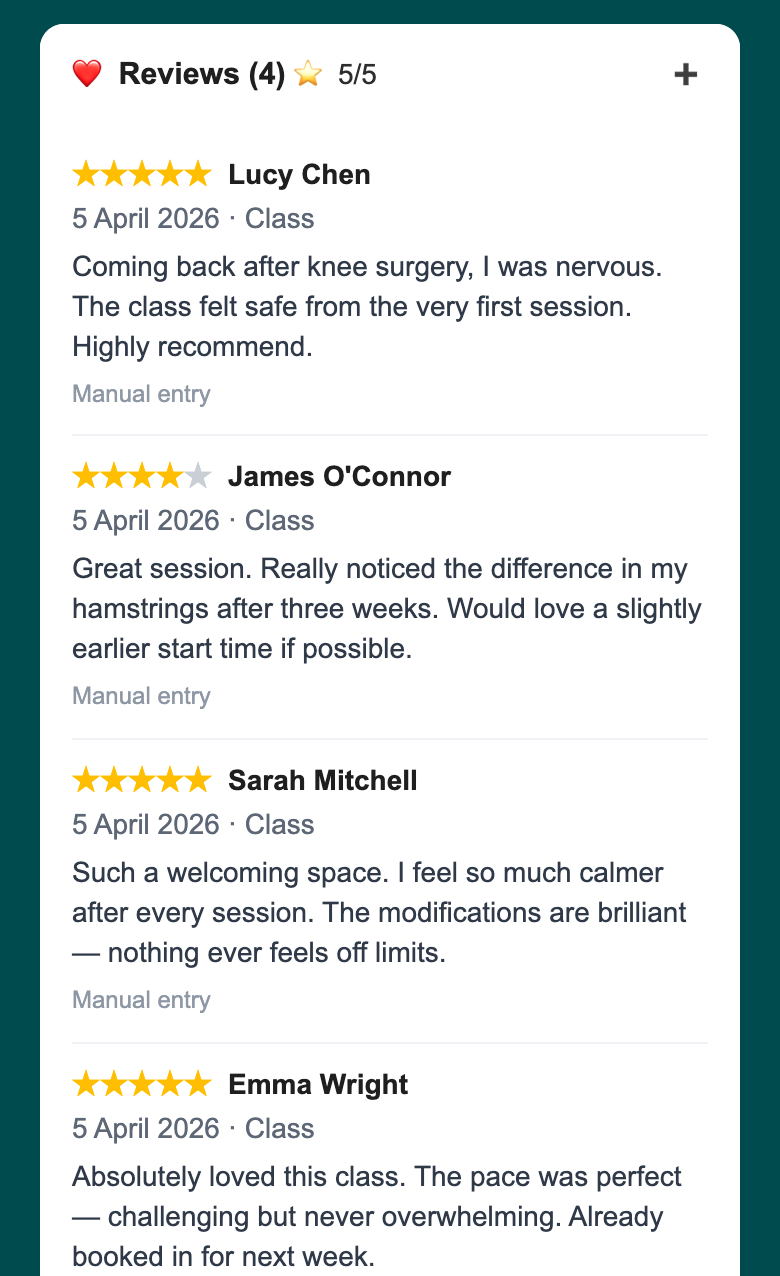
Reviews land in four places across your admin the moment a client submits one:
- Your Me/Bio section — all reviews, ordered most recent first. The section heading shows your total count and average at a glance:
⭐ Reviews (12) · 4.8/5 - Each class on your upcoming tab — a
⭐ {avg}indicator appears next to the attendance count for any class that has at least one review. Tap it to go straight to the attendees for that session - Each attendee card — when a client has reviewed that specific class, their stars and text appear inline below their booking details
- Each client’s profile — a star average across every review that client has left you, with their full review history one tap away
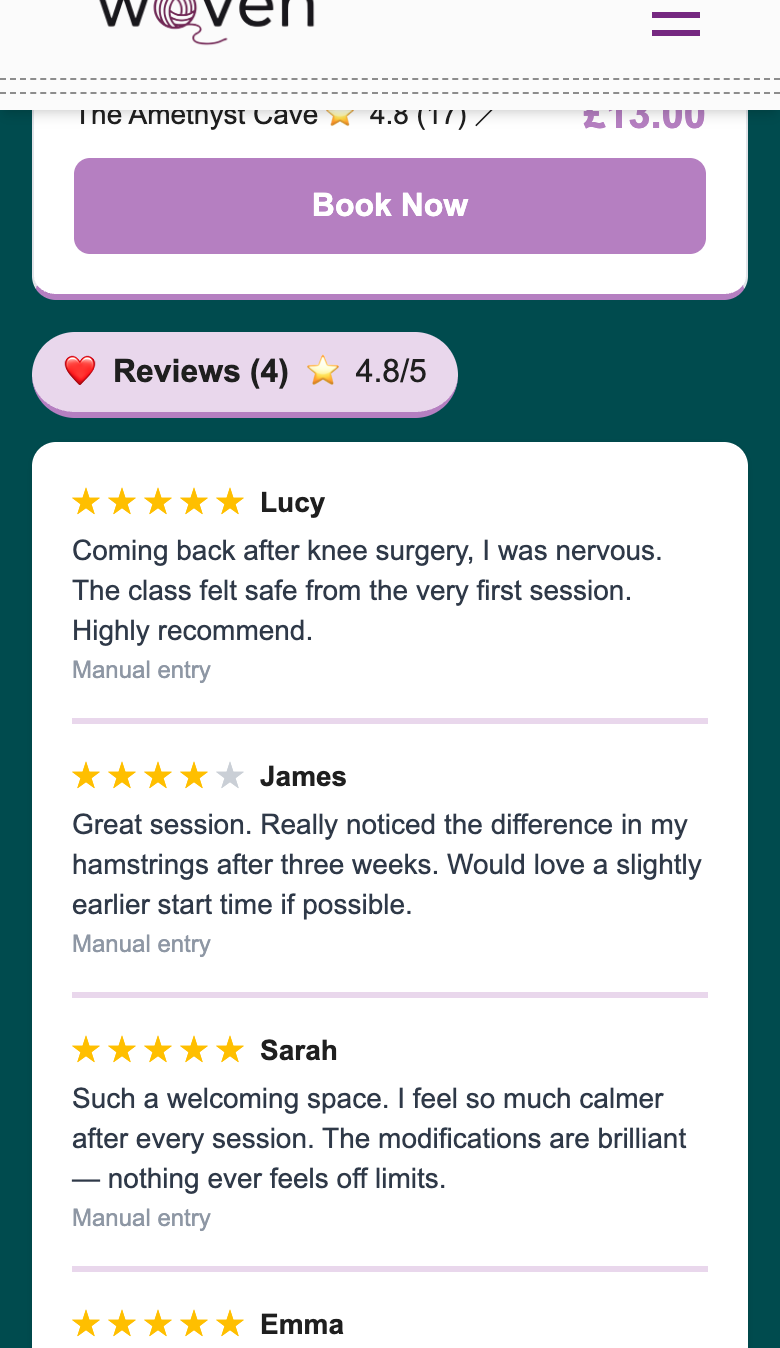
On your public profile, reviews surface automatically — client first name, star rating, and any text they left. An average rating and total count appear at the top of the section. The reviews block only shows once you have at least one published review — visitors never see an empty placeholder.
How reviews appear on your public page →
Already Have Reviews on Google or Instagram?
If you’ve built up reviews elsewhere before joining Woven, you don’t have to start from zero.
Use the manual review entry in your Me/Bio section. Select the client from your existing records, add the star rating (1–5) and any text they left, and choose the source. Manual reviews appear alongside WhatsApp-sourced reviews everywhere reviews display — on your admin, in client profiles, and on your public page.
Both you and the client can see the source tag (via WhatsApp or Manual entry). Visitors to your public page see the same display for both — there’s no visible distinction in how the review looks to someone considering booking.
This makes Woven the record of truth for your reviews, not just a tool for collecting new ones.
Client profiles and review history →
How Clients Experience the Review Request
From your client’s point of view, the review request arrives in the middle of an existing conversation — not as a cold email from a platform they don’t recognise.
The WhatsApp message lands using the review_request template: it names the class, thanks them for attending, and drops a link. The link takes them to a lightweight branded form showing the class name, date, and their first name — Woven already knows who they are from the booking. No login prompt. No “create an account to continue.”
What the form requires:
- Star rating: mandatory, 1–5 stars
- Review text: optional, up to 2,000 characters
That’s it. The average client completes it in under 30 seconds.
The link is valid for 30 days from the moment the review request fires. After that, it expires — the HMAC signature fails validation and the form stops accepting submissions. If a client reaches out after the window has closed, add their review manually from your Me/Bio section.
One structural protection worth knowing: if the same client tries to submit a second review for the same class, the form shows their original rating. No duplicates, no gaming — the dedup check runs at the booking level.
The review request is the final step in your client’s Woven journey — from booking to confirmation to class reminder to review. How your clients experience the full booking journey →
🎉 No Monthly Subscription for Review Software
Most dedicated review management tools charge a separate monthly fee — Birdeye, Podium, and similar platforms are priced for large businesses with marketing budgets to match.
Woven’s review collection is part of the platform. No add-on. No upgrade tier. No extra fee. The moment attendance tracking is part of your admin workflow, review collection runs automatically alongside it.
Woven charges per booking transaction, not per feature. Reviews, like everything else, are included in what you already have.
Tips for Getting the Most from Woven Reviews
- Mark attendance promptly. The review request fires the moment you mark a client attended — the sooner you do it, the closer the experience is to the class. Clients who receive the request within a few hours of leaving are far more likely to respond than those who get it a day later
- Use manual entry for your existing reviews. Don’t arrive at Woven with zero — import your best Google or Instagram reviews immediately. A profile with ten reviews from day one is more inviting than one with none
- Share your public page link actively. Reviews on your profile only convert new clients if those clients can see them. Put your Woven page link in your Instagram bio, WhatsApp status, and email signature — every visit is a chance to let your reviews do the selling
- Don’t filter or remove reviews. All reviews publish as submitted. The product earns the rating — that transparency is what makes reviews credible. A 4.6 with 20 reviews is more trustworthy to a prospect than a suspiciously perfect 5.0 from three entries
- Reflect alongside your reviews. Your post-class reflection and client reviews cover two sides of the same class. Reading both together gives you a more complete picture of what’s working and what isn’t
Related:
- How reviews appear on your public page →
- How to manage class attendance in Woven →
- Client profiles and review history →
- How your clients experience Woven →
Start capturing reviews with Woven — thankswoven.com