
Feature
Know Your Clients — Simple Client Management Software for Service Businesses
Track client attendance, booking history, and personal notes — without the CRM bloat. Woven's client management is built for service businesses, not sales teams.
Why Client Management Is Different for Service Businesses
Sales teams need pipelines. You need to know who showed up last Tuesday.
The admin problem for a yoga teacher or personal trainer isn’t managing leads through deal stages — it’s knowing your clients well enough to serve them properly. And most software designed for “client management” is built for the wrong problem.
Without a proper system, this is what piles up:
- Client information lives everywhere — booking emails, WhatsApp messages, a notebook, your memory
- You can’t see patterns — no easy way to spot who’s drifting, who hasn’t booked in three weeks, or which clients are most engaged
- Notes get lost — you remember Sarah has a knee injury when she’s standing in front of you, but not always when you’re planning the session
- You can’t ask “who are my most active clients?” — because there’s no data to look at
Woven tracks the things that actually matter for service businesses — attendance, notes, booking patterns, spend — in one place. No sales pipeline. No lead scoring. Just your clients, and everything you need to know about them.
Your Client List — Everyone in One Place
Your client list is in the Clients tab of your Woven admin. By default it shows all your clients sorted by membership — the people who’ve been with you longest at the top.
Every client appears the moment they book through Woven. No manual setup — when someone completes a booking for the first time, their profile is created automatically using their phone number as the identifier. Their name (from checkout), phone number, and booking are all recorded without you lifting a finger.
If you need to add someone who hasn’t booked through Woven yet — a walk-in, a referral, someone you met in person — use the + button. A name and phone number is all you need. Phone is how Woven identifies clients and sends them WhatsApp confirmations, so it’s the one field that matters. Email is optional.
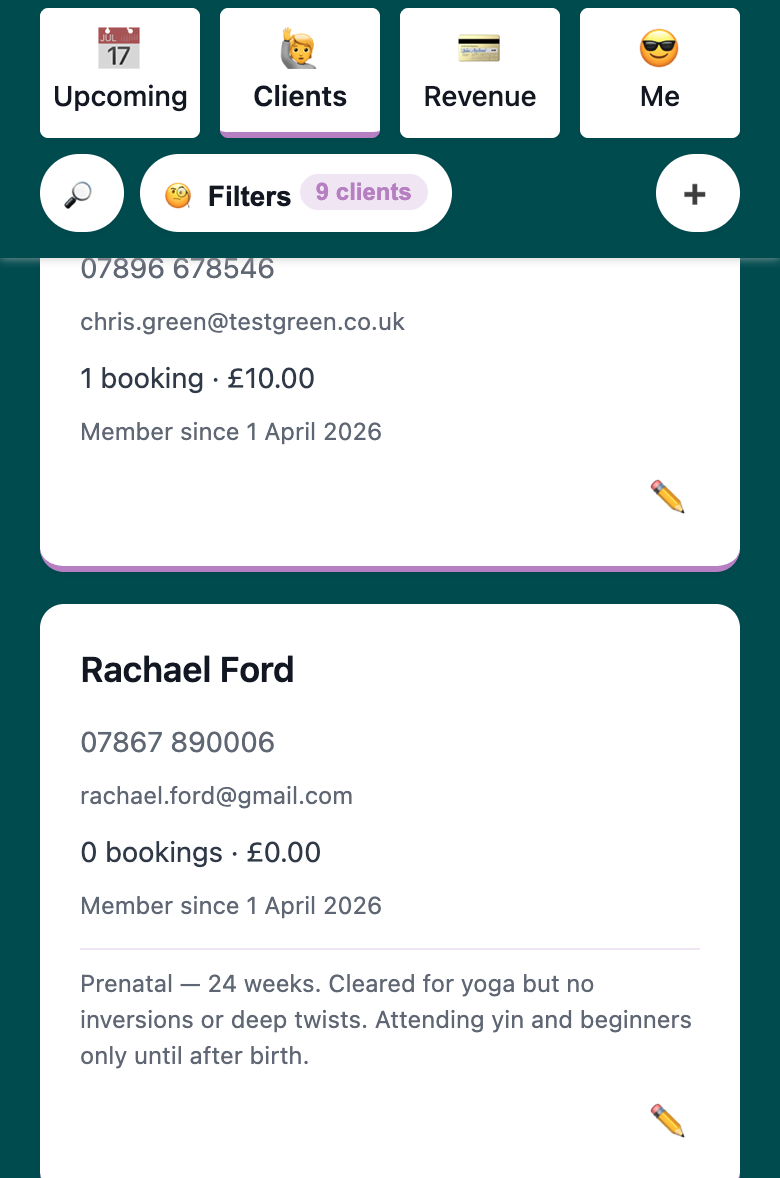
Every client card shows:
- Name and phone number
- Bookings — total sessions booked
- Spend — total amount paid
- Attendance rate — sessions attended as a proportion of sessions booked
You can search by name or phone number from the search button. The list is yours — clients don’t have a login or dashboard. They see your public page and get WhatsApp messages. The client list is your view.
Managing your clients in Woven →
Client Notes — Remember What Matters About Every Client
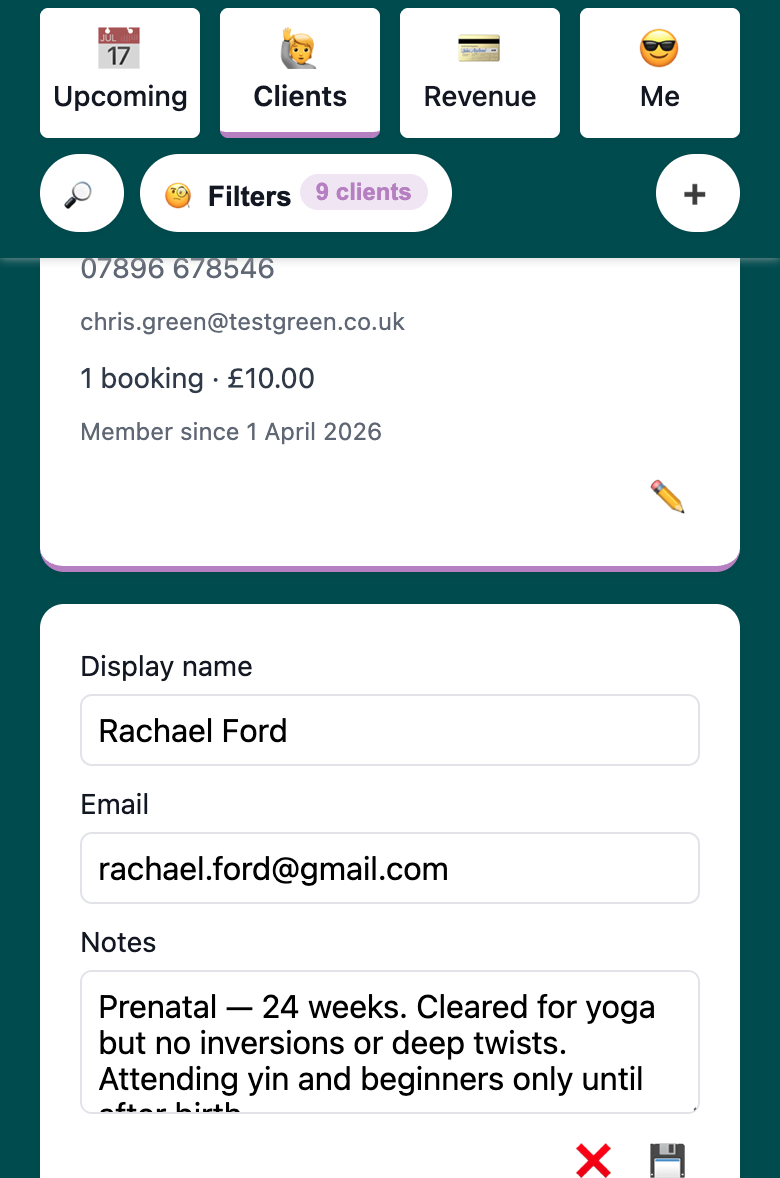
Each client profile has a freeform notes field. It’s private — only you see it.
Use it for anything you’d want to remember before a session or record afterwards:
- Injuries and limitations — “Left knee injury — avoid deep lunges”, “Recent shoulder surgery, modifying upper-body work”
- Preferences — “Prefers back of room”, “Always late — leave the door unlocked until 5 past”
- Goals — “Training for first half marathon — wants endurance focus”, “Working on flexibility, not strength”
- Personal detail — “Mentioned her daughter’s starting school this September”, “Celebrating 10 years of yoga”
The kind of detail that makes clients feel genuinely looked after doesn’t come from a CRM. It comes from writing it down after a session while it’s fresh, and having it ready before the next one.
Notes are front and centre in every client profile — not buried behind tabs, not hidden in a sidebar. Add a note after every session and you’ll build a picture of each client that makes your service noticeably better.
Attendance Tracking — See Who Shows Up (And How)
Every booking in Woven records an attendance status. View the full attendance history per client from their profile.
Woven tracks five attendance statuses — more granular than most tools:
- 🙋 Attended — they were there
- 🤨 Attended (Late) — they made it, but arrived after the session started
- 👎 No Show (Notified Me) — they didn’t come, but they let you know in advance
- 🤢 No Show (Unwell) — they couldn’t attend due to illness
- ⛔️ No Show (No Contact) — they didn’t show up and didn’t get in touch
The three no-show variants matter. A client who calls ahead to say they’re ill is different from one who just doesn’t appear. That distinction tells you something about how they treat their commitment, and it shapes how you follow up.
Note: booking cancellation and attendance are separate things. A client who cancels their booking before the session doesn’t get an attendance status — they cancelled. Attendance only applies to sessions that happened (or were supposed to happen). This is the right separation: your attendance record reflects what actually happened on the day, not what was on the schedule.
The track → spot → act pattern:
- Track — mark attendance after every session. It takes seconds
- Spot — filter your client list by attendance trends to see who’s dropping off, who’s consistent, who hasn’t shown up in a while
- Act — reach out before you lose them. A quick WhatsApp to a client who’s missed three sessions costs you nothing and might save a relationship
→ How to reduce no-shows and cancellations in your yoga classes
Client Filters and Sorting — Understand Your Client Base
The filter toolbar is where the data turns into insight.
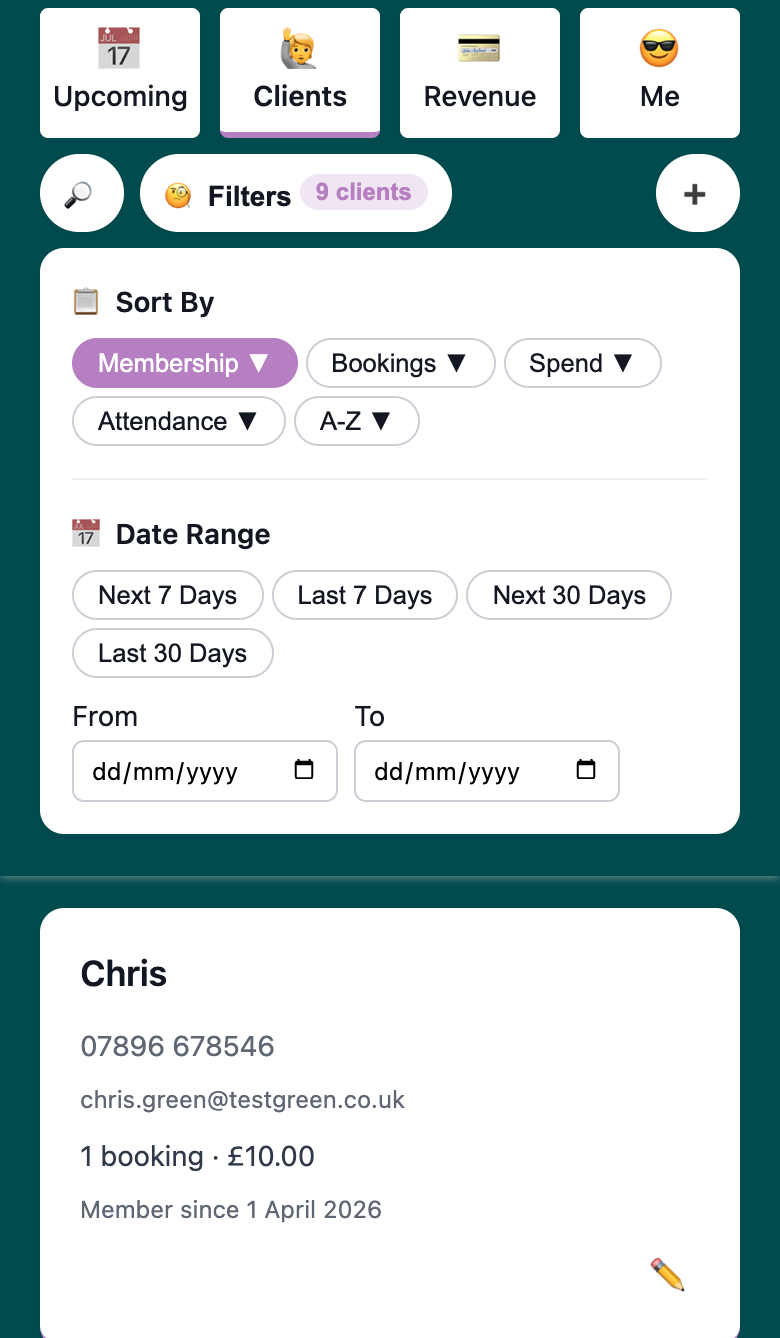
Sort your client list by:
- Membership — newest or longest-standing clients first
- Bookings — most sessions booked, or fewest
- Spend — highest-value clients first, or lowest
- Attendance Rate — who’s most consistent, or who’s starting to drift
- A–Z — alphabetical by name
Date range filtering lets you scope the whole list to a specific window. Who booked in the last 30 days? Who was active in January but hasn’t booked since? Which clients had perfect attendance last month? The date filter applies to booking counts, spend, and attendance calculations — so you’re seeing behaviour in the window that matters to you, not just all-time totals.
A few ways this plays out in practice:
- “Who are my most valuable clients?” — sort by spend. Your highest-revenue clients are visible immediately. These are the people you most want to retain, and now you know who they are
- “Who’s going quiet?” — sort by last booking date, or filter to the last 30 days and look for clients with zero bookings
- “Who needs a follow-up?” — filter by attendance trends, or sort by attendance rate to surface your least consistent clients
- “Who are my regulars?” — sort by booking count, or attendance rate, to see who shows up every week
A CRM gives you “lead status” and “deal value.” Woven gives you “this client attended 14 of their last 15 sessions and hasn’t booked since mid-February” — the information a service business actually acts on.
Client Management Software vs a CRM — What Service Businesses Actually Need
Every result on the first page of Google for “client management software” assumes you need a sales pipeline. Here’s what CRMs are built for — and why most of it doesn’t apply to a service business:
- Sales pipelines and lead scoring: CRMs track prospects through deal stages and rank them by conversion likelihood. Your clients have already paid for a class. You don’t have leads — you have people
- Marketing automation: email sequences, drip campaigns, lead nurture funnels. Useful if you’re selling to a list. Your client relationship happens in a studio, not an email inbox
- Seat-based pricing: most CRMs charge per user, per month — on top of whatever booking software you’re already paying for. Woven includes client management in the platform, no extra subscription required
If you have a sales team, pipeline stages, and marketing automation needs — a CRM is the right tool. If you run a service business and need to know your clients, Woven is built for that.
🎉 The Cost of Knowing Your Clients — Client Management Software Pricing
No separate subscription for client management. No per-user seat fees. No add-on module pricing.
Your client list, notes, attendance history, filters, booking records, and spend data are all included in Woven. Woven charges per booking transaction — you pay when clients book and pay. Client management is part of the platform, not a feature you unlock at a higher tier.
Compare that to a full CRM: even the cheaper options start at £10–20/user/month, and you’d still need separate booking software. Woven handles both — client management and bookings, in one place, with no CRM subscription stacking on top.
Tips for Getting the Most From Client Management in Woven
- Add notes after every session — record injuries, preferences, and milestones while they’re fresh. The detail you capture after session two is what makes session twelve feel personal
- Check your attendance rate sort weekly — clients drifting below consistent attendance are your retention risk. Catching them at two no-shows is easier than winning them back after five
- Use the date range filter monthly — who was active last month? Who’s been quiet for 30 days? A monthly pass through the list surfaces the conversations worth having
- Sort by spend occasionally — your highest-value clients aren’t always your loudest ones. Knowing who they are is worth ten minutes of your time