
Feature
Discount Codes
Create discount codes for your clients — flat or percentage, scoped to classes, courses, or both, per-client limits, and inline validation on your booking form.
Why Small Business Owners Need Discount Codes
Most small business owners have goodwill to give. The client who sent three friends your way deserves a thank-you. The person who’s been curious but hasn’t booked yet might commit with a first-session discount. The regular who can’t always afford full price shouldn’t have to ask awkwardly.
But most booking tools either don’t support discount codes at all, or they’ve buried them behind a higher-tier plan, or the client experience is clunky enough that you end up handling it manually — a WhatsApp message, a bit knocked off the next invoice, a cash refund at the door. That creates admin noise and it doesn’t look professional.
Discount codes for small business — sometimes called voucher codes — are built directly into Woven’s booking form. Clients enter a code, see the adjusted price before they pay, and book in one flow. No redirects. No wondering whether it worked.
How Discount Codes Work in Woven
You manage discount codes from the Discounts accordion in your admin settings — the same interface pattern as your locations and FAQs. Creating a code takes about thirty seconds:
- Open the Discounts section and click the add button.
- Enter your code — any combination of letters and numbers, 3 to 20 characters. Something like
WELCOME10,REFER20, orJAN25. - Choose the type: flat amount (e.g. £10 off) or percentage (e.g. 20% off).
- Set the value — pence for flat codes, a whole number for percentages.
- Choose what the code applies to: Classes, Courses, or Both. The default is Both — a code created without changing this works for every booking type you offer. Set it to Classes if you want it accepted only on single-session bookings, or Courses if it’s meant for multi-week enrolments only.
- Optionally add an expiry date. Leave it blank and the code never expires.
- Optionally set a per-client usage limit. The default is 1 use per client.
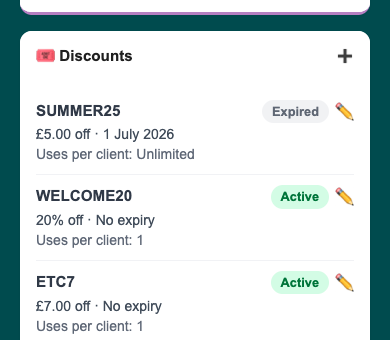
Each code in your list shows its current status at a glance: Active (green) or Expired (grey). You can edit any code after creating it, and delete codes you no longer need — deleting a code preserves the booking records that used it.
Discount codes are included at no extra cost. The same 1.5% platform fee applies to paid bookings, calculated on the discounted amount.
What Clients See on the Booking Form
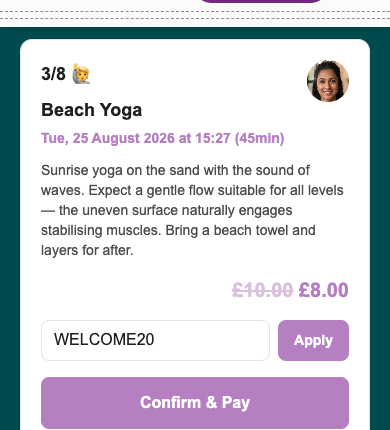
When a client opens a paid class or course booking page, they see a discount code field above the payment button. The flow is simple and immediate:
- Client enters their code and taps Apply.
- The price summary updates on the spot — Original, Discount, and Total — without a page reload or redirect.
- If the price looks right, they confirm and pay at the adjusted rate.
The error messages are plain. If a code doesn’t exist: “Code not recognised.” If a code has passed its expiry date: “This code has expired.” If a code isn’t valid for that booking type — for example, a courses-only code used on a single-session booking — the client sees a clear message telling them it doesn’t apply. No vague failure states.
When a 100% discount brings the price to zero, the booking routes through Woven’s free booking flow — no Stripe checkout, no £0 payment screen. The button label changes to “Book for Free” and the client confirms without entering card details. It works cleanly, exactly like booking a free class, with nothing special required on your end.
One small UX detail: if a client’s session expires while they’re mid-booking and they reload the page, the ?discount_error= URL parameter restores any error message automatically. They don’t lose their place or need to re-enter the code.
Per-client limits work differently depending on the code. For 100%-off codes, a second attempt is blocked instantly — the free booking flow checks usage before confirming, so there’s nothing to reconcile afterward. For paid discounts, Woven can’t pre-reject: Stripe only collects the client’s phone number after payment, so it flags a limit breach for you to review — the booking still completes since the payment’s already been taken.
Use Cases — How Small Business Owners Use Discount Codes
Discount codes for small business aren’t about running mass promotions. Most useful cases are targeted: one code, one person, one purpose.
Loyalty rewards for regulars
Create a personal code — something like THANKS20 — and send it directly to a long-standing client. They feel recognised. You haven’t publicly discounted your prices.
Referral incentives Give a referring client a code to pass on. Set it to one use per new client so it can only be redeemed once by each person who receives it, without you having to track anything manually.
First-session free trials A 100% discount code for a specific new client routes cleanly through the free booking flow. No cash exchanged, no workarounds, no awkward conversation about money.
Course enrolment promotions Set a code’s scope to Courses and it applies only to multi-week enrolments — it won’t be accepted on single-session bookings. Useful when you want to run a course launch offer without discounting your regular class schedule.
Seasonal and early-bird promotions Set an expiry date when you create the code and share it publicly. When the date passes, the code stops working automatically — you don’t need to remember to disable it.
Flexible pricing for specific clients A flat-amount code that reduces the price significantly (or to zero) for clients who need more flexible access. Per-client limits mean it stays targeted rather than becoming an open discount.
| Use case | Code type | Applies to | Per-client limit | Expiry |
|---|---|---|---|---|
| Referral thank-you | Flat or % | Both | 1 | Optional |
| New client trial | 100% | Classes | 1 | Optional |
| Course launch offer | % | Courses | Unlimited | Yes |
| Seasonal promotion | % | Both | Unlimited | Yes |
| Loyalty reward | Flat or % | Both | 1 | None |
The per-client limit is the detail that makes this genuinely useful as a retention tool rather than a marketing gimmick. For free codes, it’s an instant hard stop. For paid codes, you get a clear flag if the limit’s been hit, so nothing slips through unnoticed even if you’re reviewing it after the fact.
No Complex Setup. No Tier Gating.
Major booking platforms treat promotional codes as a higher-tier feature — something you unlock after committing to a more expensive plan. Glofox and Mindbody reference discounts in their enterprise feature lists. Momoyoga’s codes redirect clients to a separate page, which breaks the flow before they’ve confirmed anything.
Woven’s discount codes are available to every business from day one. They’re built into the online booking flow, connected directly to payments — so a 100% discount correctly bypasses Stripe rather than creating a £0 charge — and the per-client tracking works alongside client management without any additional configuration.
There’s no campaign manager to configure. No additional dashboard to learn. You create a code in your admin settings, share it with whoever you have in mind, and Woven handles the validation, scope check, price adjustment, and booking confirmation automatically.
Tips for Getting the Most from Woven Discount Codes
Use the applies-to scope to target classes or courses, and naming conventions for single-class intent. Scoping a code to Classes or Courses is enforced by Woven — a courses-only code won’t be accepted on a single-session booking. Restricting to one specific class isn’t supported at the code level, so a name like TUESDAY10 or MORNINGYOGA signals the intent even though Woven doesn’t enforce it itself.
Set a per-client limit of 1 by default. It’s already the default when you create a code, and it’s the right choice for almost every use case — loyalty rewards, referrals, and trials are all meant for a single redemption, not repeat use.
Reserve 100%-off codes for your highest-trust cases. Free codes are the one type Woven blocks instantly on reuse — ideal for first-session trials where you want a hard guarantee, not just a flag to review later.
Check for discount_over_limit alerts if you’re running paid promotions widely. A paid discount that’s reused beyond its limit still completes the booking — Woven flags it for you rather than blocking the client mid-checkout, so a quick review keeps things on track.
Get started with Woven — free to start, no monthly fee.
Related: